⚙️ MS-AOS Mihin Soft - Arduino Operating System
was written for Arduino Uno in 2021.
 —————————————————————————————————————————————————————————————————
User Guide & Introduction
—————————————————————————————————————————————————————————————————
📘 1. Introduction to Arduino and MS-AOS
Arduino is a small programmable microcontroller that can interact
with the physical world using:
- sensors (temperature, light, orientation)
- actuators (LEDs, speakers, motors)
- serial communication (USB)
🧩 What is MS-AOS?
MS-AOS (MihinSoft Arduino Operating System) is a lightweight
command-driven system running on Arduino that allows you to:
- control hardware using text commands
- run multiple tasks (pseudo-multitasking)
- monitor sensors in real time
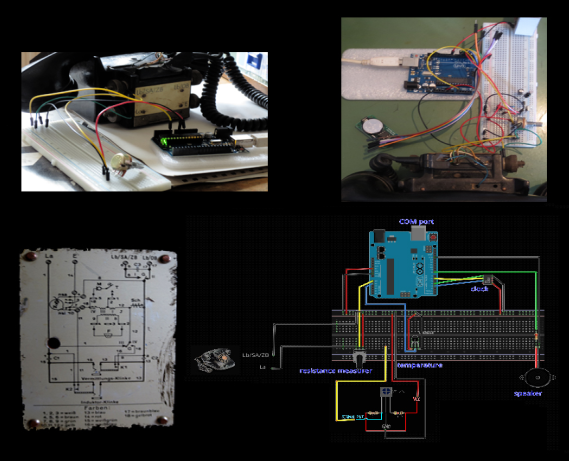
- experiment with interactive devices (like a rotary phone!)
Think of it as a tiny “terminal-based operating system” for Arduino
 —————————————————————————————————————————————————————————————————
⚙️ 2. Getting Started
🔌 Requirements:
- Arduino board (Uno or similar)
- USB cable
- Arduino IDE
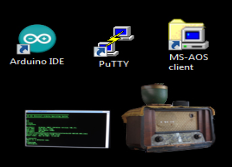
- Serial terminal (Arduino Serial Monitor or PuTTY
or other client application that listens to serial communication port)
▶️ Uploading the Program:
- Open MS-AOS.ino in Arduino IDE
- Select correct board and port
- Upload to Arduino
💻 Connecting to MS-AOS:
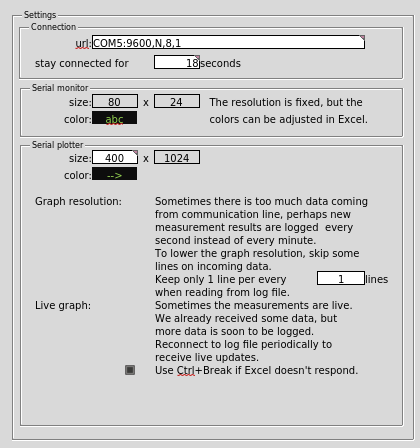
Open a serial terminal or other client application.
Baud rate: 9600
Line ending: CR or CR+LF
You should see:
*******************************************
MS-AOS MihinSoft Arduino Operating System
*******************************************
a:>
You are now inside the system.
 —————————————————————————————————————————————————————————————————
⌨️ 3. Command Interface
MS-AOS works like a command-line system.
Type commands and press Enter.
🧾 Core Commands
Command Description
help Show all commands
reset Restart Arduino
beep Play sound on buzzer
sysinfo Show memory & system info
light Toggle RGB LED
🔬 Measurement Commands
Command Function
upor Read resistance (A0)
temperatura Read temperature (A1)
orientacija Digital orientation (pin 7)
svetloba Light level (A2)
spomin Show free RAM
☎️ Special Device
Command Description
slusalka Enable rotary phone interface
 —————————————————————————————————————————————————————————————————
🔁 4. Multitasking System
MS-AOS simulates multitasking using timed loops.
Each task:
runs at its own interval
can be turned ON/OFF
runs independently
Example:
temperatura
👉 Starts continuous temperature monitoring every 5 seconds.
—————————————————————————————————————————————————————————————————
☎️ 5. Rotary Phone Interface (Highlight Feature)
This is one of the most unique parts of the system.
💡 What it does
Reads analog signal from a rotary dial phone
Detects pulses ("clicks")
Converts them into digits
Builds full phone numbers
🧠 Internal logic
Detects “peaks” and “valleys” in signal
Counts pulses → determines digit
Example:
10 pulses → digit 0
3 pulses → digit 3
🎨 Output behavior
Displays typed number in terminal
Changes RGB LED color based on digit
Plays tones (dial tone / ringing)
🧪 Example Output
dvignjena slusalka
zavrteli ste 3
zavrteli ste 34
zavrteli ste 345
 —————————————————————————————————————————————————————————————————
💡 6. LED Control System
RGB LED connected to pins:
Red → pin 11
Green → pin 9
Blue → pin 10
Behavior
light toggles white light
Phone digits map to colors
Example mapping
Digit Color
2 Red
3 Green
4 Blue
5 Yellow
0 Off
—————————————————————————————————————————————————————————————————
🔊 7. Sound System
Uses a buzzer on pin 8.
Features
Beep command
Dial tone simulation
Ringing signal
Busy tone
Melody Engine
Custom timing system generates patterns like:
dial tone
ringing
silence
—————————————————————————————————————————————————————————————————
🧠 8. System Information
Command:
sysinfo
Displays:
Free RAM
Memory usage
Sketch size
Compile date
 —————————————————————————————————————————————————————————————————
🔬 9. Example Applications
This platform is surprisingly versatile. Here are ideas:
📞 A. Retro Telephone System
Dial numbers using rotary phone
Trigger actions per number
Home automation via dialing
🏠 B. Smart Home Controller
Control lights with commands
Monitor temperature & light
Add relays for appliances
🧪 C. Sensor Monitoring Station
Continuous logging via serial
Use PuTTY to save logs
Analyze environmental data
🎮 D. Interactive Game Device
Use phone dial as input
LED + sound feedback
Puzzle / code-entry game
🧠 E. Embedded CLI System
Extend commands
Add file-like memory
Build mini OS
🔐 F. Security / Access System
Dial code to unlock
Validate sequences
Trigger alarm or LED
🚀 G. Advanced Ideas
Add EEPROM → persistent memory
Add LCD display → standalone terminal
Add WiFi module → remote control
Integrate with your Ned AI system
—————————————————————————————————————————————————————————————————
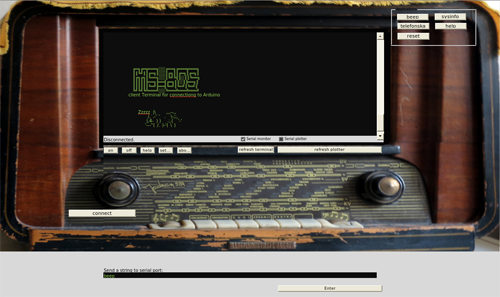
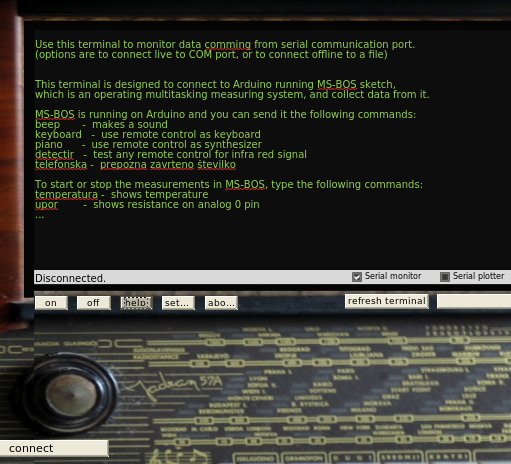
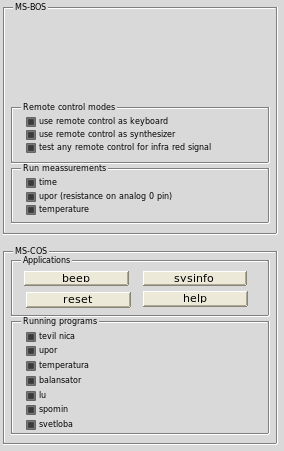
10. Online client application
You can connect to Arduino measuring system remotely, through
internet page MS-AOS client.
The page is under construction, because this is a home project
where Arduino is not available all the time and is not connected
to web server all the time.
On this page, although Terminal is probably not connected to
Arduino, you can get the glimpse of what client app can ask from
MS-AOS system.
—————————————————————————————————————————————————————————————————
11. Download section
If you are interested in Arduino software you can download MS-AOS
and client application originally written in MS Excel in 2021 and
later rewritten for Libre Office format in 2026.
For more info, contact miha.podrzaj@proton.me