 Slideshow
Photographer's utilities for working with photo files. Suitable for
stop motion animation, photo browsing and quick editing, movie making.
Written by Miha in 2026
---------------------------------------------------------------------------------
 Table of contents
---------------------------------------------------------------------------------
1. Introduction
2. Browsing and editing photos
3. Working with playlists
4. Movie making
---------------------------------------------------------------------------------
 1. INTRODUCTION
---------------------------------------------------------------------------------
Slideshow is a desktop app designed for creating time lapse and stop motion
animation, and it suits varous purposes:
- it is suitable for browsing through photo files,
- editing files on the fly (downsizong, rotating)
- creating photo albums, slideshows and presentations,
- creating movies
---------------------------------------------------------------------------------
 2. Browsing and editing photos
---------------------------------------------------------------------------------
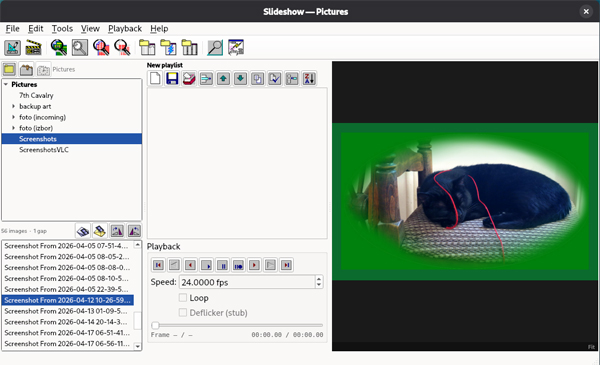
Use the folder panel to open a directory and inspect its files.
Click a file to preview it in the viewer.
Double-click a file to add it to the playlist.
The app can show file details and EXIF information.
F11 opens fullscreen viewing for a larger preview.
You can also use the downsizing tool for batch image resizing.
---------------------------------------------------------------------------------
 3. Working with playlists
---------------------------------------------------------------------------------
A playlist is the ordered list of frames used for playback.
Create a new playlist, open an existing one, or save your work.
Add selected files or entire folders to the playlist.
Remove unwanted items, reverse the order, or flag frames.
 ---------------------------------------------------------------------------------
 4. Movie making
---------------------------------------------------------------------------------
Use the playback controls to review the sequence frame by frame.
Space starts or pauses playback.
Left and Right move one frame at a time.
Shift with Left or Right jumps five frames.
Home and End go to the first or last frame.
Use export to create a video from the current playlist.
---------------------------------------------------------------------------------