================================================================================
NED'S WORLD — User's Manual
================================================================================
ABOUT NED'S WORLD
-----------------
Ned's World is an insect simulation and AI training environment. You control
the training of a small creature named Ned, who wanders a tile-based world
looking for food. Ned has no intelligence of his own — you teach him, turn by
turn, how to behave in every situation he encounters. The knowledge you build
up is stored in a plain text file called the brain, and it grows smarter with
every training session you run.
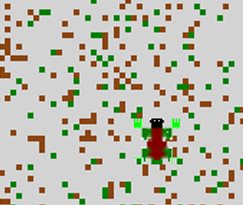 The original Ned's World was written in the 1990s. This is its modern remake.
Written by David from Texas in 1993, rewritten by Miha from Slovenia in 2026.
INTRODUCTION - WHAT ARE NEURAL NETWORKS?
There has been a lot of talk lately about neural
networks. What are neural networks? A neural network is
a collection of artificial 'neurons' connected in a
network to solve unorthodox computer operations. While
the biological 'neurons' are only used as inspiration to
create computer 'neurons', it may be useful to learn a
little about them.
Biological neurons are the fundamental unit cells of the
brain and nervous tissue. They are connected together
with fibers called dendrites and axons. The dendrites
are the inputs to the cells and the axon is the single
output. Each neuron is either 'on' or 'off'. If a
neuron is 'on' it transmits an 'on' signal over its axon.
The neuron's axon is connected to the dendrites of other
cells. The state of the neuron is determined by the
chemical charges on its inputs. If enough charge is on
the input dendrites of a neuron then it will turn 'on'
and transmit to other neurons. In this way the neurons
are like a group of parallel processing elements. The
state of one affects the state of others which in turn
affects the state of others... All of the input
dendrites of a neuron are weighted so that an 'on' coming
in on one dendrite may not hold as much value as another
'on'. These weights can be adjusted to produce a desired
effect. For instance they could be adjusted such that a
certain neuron will turn 'on' or 'fire' only when six
other specific neurons are also firing. The act of
adjusting the weights is called training.
The computer 'neurons' are simpler then their biological
counterparts. They can be represented as a group of
weight values between each connection in a network. To
see if a neuron is firing, all of the weights of the
firing inputs are added up. Outside input is also added
into the firing consideration. If the total is above a
certain threshold then the neuron is turned on. Note
that the weight can encourage (be positive) or discourage
(be negative) a neuron from firing. Training is done by
tweaking the weights in the network until the desired
state is achieved. Since the computer is a serial
problem solver and the neural networks are a set of
parallel processing elements, the 'parallel' effect is
simulated.
It was mentioned earlier that neural networks are used to
solve unorthodox computer problems. Neural networks have
been used in such varied projects as stock marked
forecasting to speech recognition. These problems are
well suited to neural networks because all the nuances of
the situation are not known. A network is trained by
providing input and training it to give a desired output.
The person doing the training need not understand the
reason or set of rules behind the input and output
relationship. For example, a business analyst may not
completely understand the factors involved in stock
pricing fluctuations but if a neural net is provided with
the correct factors it will be able to predict the
changes with proper training. The network in effect
creates the rules between input and output during
training. These rules created are flexible. This gives
a neural net the ability to take incomplete input and
still provide good results with proper training. This
characteristic makes it well suited for these types of
unorthodox applications.
In contrast, neural networks are not well suited for
traditional computing tasks, such as adding up numbers.
While a network could be trained to add up some numbers
they might not be accurate enough. We usual want numbers
to be very accurate.
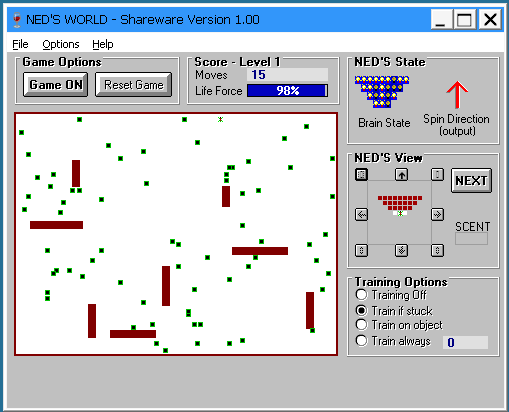 Neural Ned in NED'S WORLD is a good application for
neural networks because NED is wandering through a random
world. He needs to have flexible rules because every
situation can not be planned on ahead of time. His
flexible rules will enable him to behave correctly or at
least adequately in situations he has never been in.
--------------------------------------------------------------------------------
THE WINDOW LAYOUT
--------------------------------------------------------------------------------
The main window is divided into two panels.
Left panel — the World
The left panel shows the world map from above. The world is a grid of
100 x 100 tiles. Each tile is one of three types:
Light grey — empty ground, Ned can walk here
Brown — wall, Ned cannot enter this tile
Green — food, Ned eats it by stepping onto it
Ned himself is drawn as a small sprite overlaid on the map. His nose — a
small 4x4 pixel marker — points in the direction he is currently facing and
sits exactly on the tile he occupies. When Ned rotates or moves, the sprite
changes to face north, south, east, or west accordingly.
Below the map you will find:
Turn number — how many turns have elapsed in this session
Score — food eaten per turn, shown as a decimal (e.g. 0.042 f/t)
Speed — a horizontal scrollbar that controls how fast automated
moves play back. Slide right for faster, left for slower.
Right panel — the Simulator
The right panel changes depending on which simulator mode is active. In
Training mode it shows Ned's viewport and the leg controls described below.
--------------------------------------------------------------------------------
NED'S VIEWPORT
--------------------------------------------------------------------------------
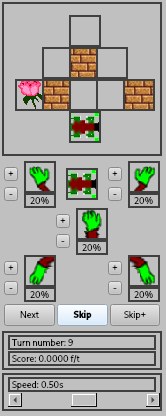
Ned has eyes. He can see nine tiles arranged in a cone in front of him. The
cone widens as it gets closer to Ned:
. . A . . one tile, three steps ahead
. B C D . three tiles, two steps ahead
E F G H I five tiles, one step ahead
N Ned himself (shown as icon, not counted in the nine)
A through I are the nine tiles Ned reads each turn. Each tile is shown as a
small icon: grey for empty, brown for wall, green for food. Ned's icon appears
below the row EFGHI, facing the direction he is currently headed.
The viewport string stored in the brain is a nine-character number built from
the tile values left-to-right, top-to-bottom: A, B, C, D, E, F, G, H, I.
Each character is 0 (empty), 1 (wall), or 2 (food).
Example: Ned faces north. There is food two steps ahead and slightly to his
right. The viewport string would be 000200000 — all empty except position D.
--------------------------------------------------------------------------------
NED'S LEGS
--------------------------------------------------------------------------------
Each turn Ned performs exactly one action. He has five possible actions, each
represented by a leg icon on the right panel:
Leg 1 (upper left of Ned) — step diagonally forward-left
Leg 2 (below Ned) — step straight forward
Leg 3 (upper right of Ned) — step diagonally forward-right
Leg 4 (lower left) — rotate 90 degrees clockwise (turn right)
Leg 5 (lower right) — rotate 90 degrees counter-clockwise (turn left)
Steps 1, 2, and 3 move Ned to a new tile. Steps 4 and 5 keep Ned on the same
tile but change his facing direction. Ned cannot step onto a wall tile; if the
chosen move would hit a wall, Ned stays in place and the turn still counts.
Under each leg icon you see a percentage label and two small +/- buttons.
The five percentages always sum to 100. They represent the probability
distribution over Ned's actions for the current turn. When you press Next,
Ned rolls the dice according to these percentages and executes the winning leg.
Double-clicking a leg icon immediately sets that leg to 100% and all others
to 0%, letting you commit to a single action quickly.
The +/- buttons adjust a leg's percentage by 5 points and renormalise the
remaining legs automatically to keep the total at 100.
--------------------------------------------------------------------------------
NED'S BRAIN
--------------------------------------------------------------------------------
Ned's brain is a plain text file, typically named brain.txt. Each line
records one situation Ned has been trained on:
000200000,0%,70%,30%,0%,0%
The first field is the nine-character viewport string. The next five fields
are the percentage for each leg. This line says: when Ned sees this exact
view of the world, move forward 70% of the time and step forward-right 30%
of the time.
The brain grows one line at a time as you train Ned. You can open, save, and
reset the brain from the Brain menu. You can also inspect or hand-edit the
brain.txt file in any text editor — the format is intentionally simple.
When Ned encounters a viewport that has no matching line in the brain, he
falls back on instinct (see below).
--------------------------------------------------------------------------------
NED'S INSTINCT
--------------------------------------------------------------------------------
Instinct is Ned's built-in fallback behaviour when his brain has no entry for
the current viewport. The rule is simple:
— If the tile directly ahead is a wall, rotate 90 degrees clockwise.
— Otherwise, step straight forward.
Instinct keeps Ned moving even in completely untrained situations. In Training
mode, instinct fires automatically on Skip and Skip More whenever the chosen
move would walk Ned into a wall, replacing the wall-hitting action with the
instinct choice for that turn.
--------------------------------------------------------------------------------
MENUS
--------------------------------------------------------------------------------
File
Exit — closes the application.
World
Reset — loads defaultworld.txt, or clears the map if the file is
not found. Ned is placed at the centre.
Generate random — fills the map randomly (10% walls, 5% food) and adds a
three-tile-thick border wall all around. Ned is placed at
the centre.
Open — loads a world from a .txt file you choose.
Save as — saves the current world to a .txt file.
World files are plain text. Each row of the map is one line of digits:
0 = empty, 1 = wall, 2 = food.
Brain
Reset — clears all entries from the brain and overwrites brain.txt.
Open — loads a brain from a .txt file you choose.
Save as — saves the current brain to a .txt file.
Simulator
Train — Manual training mode (see below). This is the default.
Selftrain — Automated self-training mode.
Run — Running mode.
Help
Contents — opens this manual.
About — displays the version information.
--------------------------------------------------------------------------------
SIMULATOR MODE: TRAIN
--------------------------------------------------------------------------------
Training mode is where you teach Ned. The right panel shows the viewport and
leg controls. At the bottom of the right panel are three buttons:
Next
Uses the percentages you have set. Ned picks a leg probabilistically and
executes the move. The chosen viewport and percentages are written to
brain.txt. Use this button when you want to record your decision.
Skip
Ignores your percentages. Instead, the brain decides (if it knows this
viewport) or instinct decides (if it does not). Nothing is written to
brain.txt. Use this to let Ned navigate familiar territory on his own
without adding any new training data.
Skip More
Runs automatically, turn after turn, as long as the brain knows each new
viewport. The moment Ned reaches a situation the brain has never seen, the
auto-run stops and control returns to you. Use this to fast-forward through
already-trained territory and arrive at the next unknown situation.
The active button is highlighted in blue to show which sub-mode is current.
In all three cases: if the selected leg would walk Ned into a wall, Skip and
Skip More automatically replace that leg with the instinct move. The Next
button does not do this — it executes your choice exactly as set, letting you
observe and correct Ned's wall-collision behaviour yourself.
 TRAINING WORKFLOW (suggested)
A typical training session goes like this:
1. Open or generate a world. Open a brain, or start fresh with Brain > Reset.
2. Observe the viewport. You see what Ned sees. Decide how you want him to
behave in this situation. Set the percentages accordingly — or double-click
the leg you want to use 100% of the time.
3. Press Next. Ned moves. The viewport updates to show his new surroundings.
The turn counter and score update.
4. If Ned is in a situation the brain already knows well, press Skip or
Skip More to let him handle it on his own and advance to the next novel
situation.
5. Repeat. Over many sessions, the brain accumulates entries and Ned becomes
progressively more capable of navigating the world and finding food.
6. Save the brain regularly with Brain > Save as.
Score is displayed as food eaten per turn (f/t). A score of 0.000 means Ned
has eaten nothing. A well-trained Ned should score somewhere above 0.010 f/t
on a typical random world. The theoretical maximum depends on food density.
--------------------------------------------------------------------------------
SIMULATOR MODE: SELFTRAIN
--------------------------------------------------------------------------------
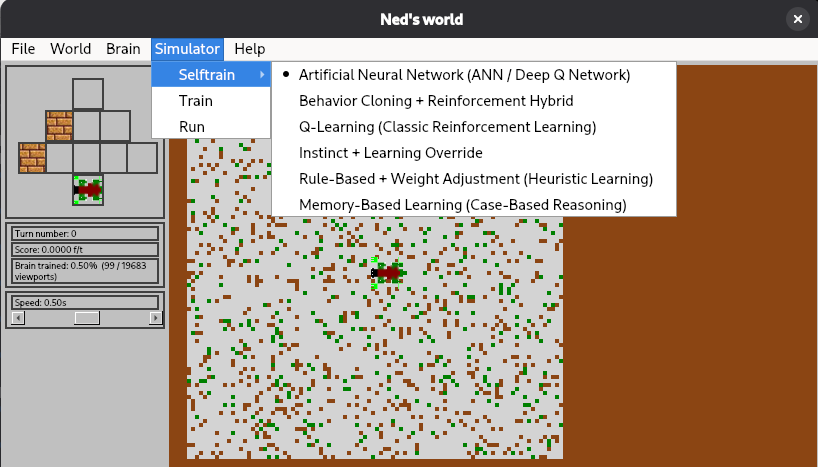
In self-training mode the percentages are set automatically by an algorithm
rather than by you. Ned runs continuously, the brain is updated in real time,
and you watch his score improve over time. To build the brain you can choose
among following algorithms:
1. Q-Learning (Classic Reinforcement Learning)💡
Ned learns:
“In this viewport, which action gives me the best long-term reward?”
Learning rule
Q(s,a) ← Q(s,a) + α * (reward + γ * max(Q(s') - Q(s,a)))
Strengths: Learns optimal behavior over time
2. Behavior Cloning + Reinforcement Hybrid💡
Add noise:
new_probs = old_probs + small_random_change
Keep if performance improves
3. Rule-Based + Weight Adjustment (Heuristic Learning)💡
Start with instincts like:
Move toward food
Avoid walls
Then adjust weights over time.
4. Memory-Based Learning (Case-Based Reasoning)💡
Instead of generalizing:
“Have I seen something similar before?”
How it fits
Compare viewport to known ones:
similarity = number_of_matching_cells
Use closest known case
5. “Instinct + Learning Override” 💡
Brain overrides instinct ONLY when confident
Behavior:
Unknown → instinct
Known → brain
Strong success → reinforce
6. Artificial Neural Network (ANN / Deep Q Network) 💡
Instead of storing:
viewport → action
You learn a function:
f(viewport) → action probabilities
 --------------------------------------------------------------------------------
SIMULATOR MODE: RUN
--------------------------------------------------------------------------------
In running mode the brain is frozen — no new lines are written. Ned uses what
he has learned and tries to beat the world record. Food regenerates at a steady
rate. Score in this mode is compared against the all-time best run ever recorded.
--------------------------------------------------------------------------------
DOWNLOAD SECTION
--------------------------------------------------------------------------------
If you are a Python programmer interested in artificial intelligence than this is for you.
Here you can download source code of Ned’s World. The program was written in Python
in Linux Debian environment. To run the program, download it, unzip it, install libraries
and run the python script.
For more info, contact miha.podrzaj@proton.me